
C 固件更新示例代碼-Firmware Update
# 固件升級(jí)示例-FirmwareUpgrade
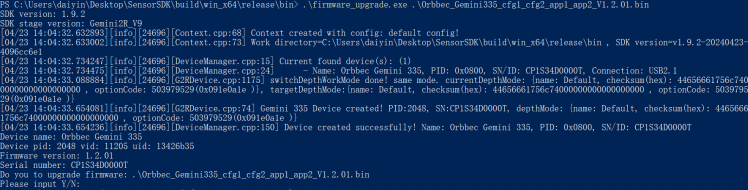
功能描述:本示例演示如何用固件文件給設(shè)備升級(jí)。
> 本示例基于C Low Level API進(jìn)行演示,示例編譯語(yǔ)言為C++,OrbbecSDK使用C語(yǔ)言API
在main函數(shù)接口通過(guò)命令參數(shù)獲取固件文件
// check_firmware_file_path()函數(shù)用于檢查文件是否存在,實(shí)際代碼中最好檢查后綴是否為bin或者img, 以及固件文件是否與目標(biāo)設(shè)備相匹配
const char *check_firmware_file_path(int argc, char **argv) {
if(argc < 2) {
printf("Please input firmware path.\n");
return "";
}
const char *filePath = *(argv + 1);
FILE *file = fopen(filePath, "r");
if(!file) {
printf("Open Firmware file failed. filePath: %s\n", filePath);
return "";
}
fclose(file);
return filePath;
}
int main(int argc, char **argv) {
const char *firmware_file_path = check_firmware_file_path(argc, argv);
if(!firmware_file_path || 0 == strlen(firmware_file_path)) {
printf("command: \n$ ./frameware_upgrade[.exe] firmwareFile.bin\n");
return 0;
}
// 接下來(lái)的業(yè)務(wù)代碼
return 0;
}
創(chuàng)建ob_context并通過(guò)ob_context獲取設(shè)備,本示例假設(shè)運(yùn)行firmware_upgrade[.exe]之前,上位機(jī)(Windows、Ubuntu、Arm平臺(tái))已經(jīng)插入設(shè)備。device_changed_callback用于固件升級(jí)后監(jiān)聽(tīng)device重啟后獲取被升級(jí)設(shè)備的業(yè)務(wù)處理
// 構(gòu)建ob_context對(duì)象
ob_error *error = NULL;
ob_context *ctx = ob_create_context(&error);
check_error(error);
// 設(shè)置設(shè)備變化監(jiān)聽(tīng)器,device_changed_callback是管理device聲明周期的關(guān)鍵函數(shù),開(kāi)發(fā)者必須關(guān)注該回調(diào)
ob_set_device_changed_callback(ctx, device_changed_callback, &callback_user_data_, &error);
check_error(error);
// 查詢當(dāng)前已經(jīng)接入的設(shè)備
ob_device_list *dev_list = ob_query_device_list(ctx, &error);
check_error(error);
// 從ob_device_list中獲取當(dāng)前接入設(shè)備的數(shù)量
int dev_count = ob_device_list_device_count(dev_list, &error);
check_error(error);
if(dev_count == 0) {
// 固件升級(jí)示例假設(shè)設(shè)備已經(jīng)接入到上位機(jī)(Windows、Ubuntu、Android平臺(tái))
printf("Device not found!\n");
return -1;
}
// 獲取第一個(gè)設(shè)備,index=0
ob_device *dev = ob_device_list_get_device(dev_list, 0, &error);
check_error(error);
// 打印設(shè)備信息
dump_device_info(dev);
獲取設(shè)備當(dāng)前的固件版本信息
// 打印設(shè)備名稱,SN,VID,PID以及固件版本
void dump_device_info(ob_device *device) {
ob_error *error = NULL;
// 獲取ob_device_info對(duì)象,通過(guò)ob_device_info可以獲取目標(biāo)設(shè)備的基本信息
ob_device_info *dev_info = ob_device_get_device_info(device, &error);
check_error(error);
// 設(shè)備名稱
const char *name = ob_device_info_name(dev_info, &error);
check_error(error);
printf("Device name: %s\n", name);
// 設(shè)備VID,PID,UID
int pid = ob_device_info_pid(dev_info, &error);
check_error(error);
int vid = ob_device_info_vid(dev_info, &error);
check_error(error);
const char *uid = ob_device_info_uid(dev_info, &error);
check_error(error);
printf("Device pid: %d vid: %d uid: %s\n", pid, vid, uid);
// 設(shè)備當(dāng)前的固件版本號(hào)
const char *fw_ver = ob_device_info_firmware_version(dev_info, &error);
check_error(error);
printf("Firmware version: %s\n", fw_ver);
// 設(shè)備SN
const char *sn = ob_device_info_serial_number(dev_info, &error);
check_error(error);
printf("Serial number: %s\n", sn);
// 釋放資源,否則會(huì)造成內(nèi)存泄漏
ob_delete_device_info(dev_info, &error);
check_error(error);
}
給目標(biāo)設(shè)備升級(jí)固件
a. 實(shí)現(xiàn)C API的固件升級(jí)回調(diào)接口;
b. 調(diào)用固件升級(jí)接口進(jìn)行升級(jí);
// 實(shí)現(xiàn)C API的固件升級(jí)回調(diào)接口;
void device_upgrade_callback(ob_upgrade_state state, const char *message, uint8_t percent, void *user_data) {
if(state == STAT_START) {
printf("Upgrade Firmware start\n");
}
else if(state == STAT_FILE_TRANSFER) {
printf("Upgrade Firmware file transfer, percent: %u\n", (uint32_t)percent);
}
else if(state == STAT_IN_PROGRESS) {
printf("Upgrade Firmware in progress, percent: %u\n", (uint32_t)percent);
}
else if(state == STAT_DONE) {
// 固件升級(jí)成功
printf("Upgrade Firmware done, percent: %u\n", (uint32_t)percent);
is_upgrade_success_ = true;
}
else if(state == STAT_VERIFY_IMAGE) {
printf("Upgrade Firmware verify image\n");
}
else {
// 固件升級(jí)失敗
printf("Upgrade Firmware failed. state: %d, errMsg: %s, percent: %u \n", (int)state, message ? message : "", (uint32_t)percent);
}
}
// 對(duì)目標(biāo)設(shè)備進(jìn)行固件升級(jí)
bool upgrade_firmware(ob_device *device, const char *firmwarePath) {
const char *index = strstr(firmwarePath, ".img");
bool isImgFile = (bool)index;
index = strstr(firmwarePath, ".bin");
bool isBinFile = (bool)index;
if(!(isImgFile || isBinFile)) {
// 固件升級(jí)文件一般為bin或者img,實(shí)際業(yè)務(wù)中最好通過(guò)文件名稱、文件MD5等信息做防呆
printf("Upgrade Fimware failed. invalid firmware file: %s\n", firmwarePath);
return false;
}
// 調(diào)用固件升級(jí)接口進(jìn)行升級(jí);
is_upgrade_success_ = false;
ob_error *error = NULL;
ob_device_upgrade(device, firmwarePath, device_upgrade_callback, false, &callback_user_data_, &error);
check_error(error);
return is_upgrade_success_;
}
固件升級(jí)成功后,需要重啟設(shè)備。重啟設(shè)備有兩種方式,一種是拔插設(shè)備(或者操作系統(tǒng)重啟),另一種是調(diào)用OrbbecSDK的reboot接口。等設(shè)備上線后,通過(guò)本示例的dump_device_info()函數(shù)可以查詢當(dāng)前設(shè)備固件版本信息
以下示例演示通過(guò)固件reboot接口重啟設(shè)備
// 重啟設(shè)備
printf("Reboot device\n");
is_device_removed_ = false;
is_wait_reboot_complete_ = true;
ob_device_reboot(dev, &error);
check_error(error);
// 釋放資源,防止內(nèi)存泄漏
ob_delete_device(dev, &error);
check_error(error);
在ob_device_changed_callback可以監(jiān)聽(tīng)設(shè)備重啟時(shí)下線、上線的事件,詳情可以看熱拔插示例
// 監(jiān)聽(tīng)設(shè)備變化
void device_changed_callback(ob_device_list *removed, ob_device_list *added, void *user_data) {
ob_error *error = NULL;
// 通過(guò)added處理上線的設(shè)備
// 通過(guò)removed處理下線的設(shè)備
// 釋放資源,避免內(nèi)存泄漏
ob_delete_device_list(removed, &error);
check_error(error);
// 釋放資源,避免內(nèi)存泄漏
ob_delete_device_list(added, &error);
check_error(error);
}
預(yù)期輸出: