

C++ 彩色流示例代碼-Color Stream Viewer
# 彩色示例-ColorViewer
功能描述:本示例主要演示了使用SDK獲取彩色數(shù)據(jù)并繪制顯示、獲取分辨率并選擇進(jìn)行設(shè)置、顯示彩色圖像,并通過ESC_KEY鍵退出程序
> 本示例基于C++ High Level API進(jìn)行演示
首先需要?jiǎng)?chuàng)建一個(gè)Pipeline,通過Pipeline可以很容易的打開和關(guān)閉多種類型的流并獲取一組幀數(shù)據(jù)
ob::Pipeline pipe;
獲取彩色相機(jī)的所有流配置,包括流的分辨率,幀率,以及幀的格式
// Create a pipeline with default device
ob::Pipeline pipe;
// Configure which streams to enable or disable for the Pipeline by creating a Config
std::shared_ptr<ob::Config> config = std::make_shared<ob::Config>();
std::shared_ptr<ob::VideoStreamProfile> colorProfile = nullptr;
try {
// Get all stream profiles of the color camera, including stream resolution, frame rate, and frame format
auto profiles = pipe.getStreamProfileList(OB_SENSOR_COLOR);
try {
// Find the corresponding Profile according to the specified format, and choose the RGB888 format first
colorProfile = profiles->getVideoStreamProfile(640, 480, OB_FORMAT_YUYV, 30);
}
catch(ob::Error &e) {
// If the specified format is not found, select the first one (default stream profile)
colorProfile = std::const_pointer_cast<ob::StreamProfile>(profiles->getProfile(OB_PROFILE_DEFAULT))->as<ob::VideoStreamProfile>();
}
config->enableStream(colorProfile);
}
catch(ob::Error &e) {
std::cerr << "Current device is not support color sensor!" << std::endl;
exit(EXIT_FAILURE);
}
```
啟動(dòng)在Config中配置的流
pipe.start(config);
以阻塞的方式等待一幀數(shù)據(jù),該幀是一個(gè)復(fù)合幀,里面包含配置里啟用的所有流的幀數(shù)據(jù),并設(shè)置幀的等待超時(shí)時(shí)間
auto frameSet = pipe.waitForFrames(100); //設(shè)置等待時(shí)間為100ms
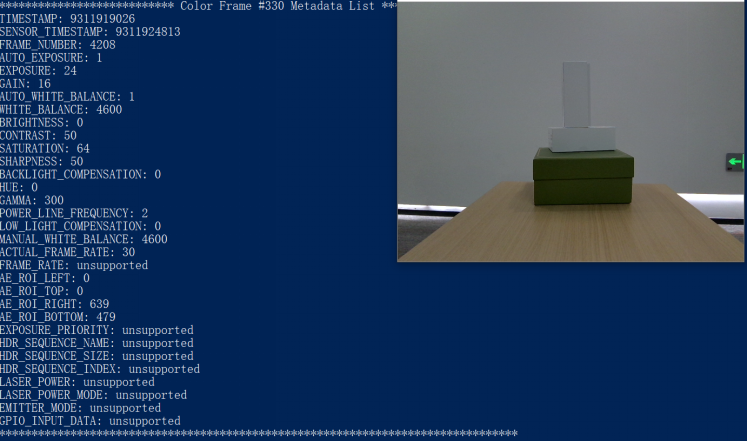
每30幀打印一次metadata
// print metadata every 30 frames
auto index = colorFrame->index();
if(index % 30 == 0) {
std::cout << "*************************** Color Frame #" << index << " Metadata List ********************************" << std::endl;
for(int metaDataType = 0; metaDataType < OB_FRAME_METADATA_TYPE_COUNT; metaDataType++) {
// Check if it is supported metaDataType for current frame
if(colorFrame->hasMetadata((OBFrameMetadataType)metaDataType)) {
// Get the value of the metadata
std::cout << metaDataTypes[metaDataType] << ": " << colorFrame->getMetadataValue((OBFrameMetadataType)metaDataType) << std::endl;
}
else {
std::cout << metaDataTypes[metaDataType] << ": " << "unsupported" << std::endl;
}
}
std::cout << "********************************************************************************" << std::endl << std::endl;
}
停止Pipeline,將不再產(chǎn)生幀數(shù)據(jù)
pipe.stop();
最終的彩色圖顯示如下
程序正常退出之后資源將會(huì)自動(dòng)釋放