
C++ 深度精度示例代碼-Depth Unit Control
# 深度精度示例-DepthUnitControl
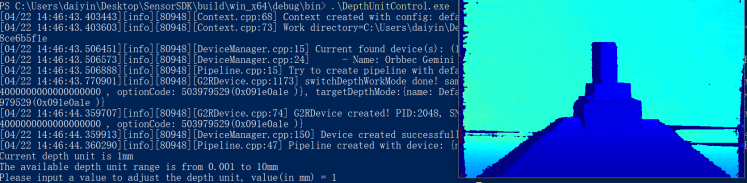
功能描述:演示獲取深度精度操作,顯示深度圖像,輸出深度精度,并通過ESC_KEY鍵退出程序
>本示例基于C++ High Level API進(jìn)行演示
創(chuàng)建Pipeline及流配置,并通過Pipeline獲取設(shè)備
// Create a pipeline with default device
ob::Pipeline pipe;
// Get the device inside the pipeline
auto device = pipe.getDevice()
檢查獲取深度精度的方式
bool changeDepthUnitFlag = false;
// check the way to adjust depth unit
if(device->isPropertySupported(OB_PROP_DEPTH_PRECISION_LEVEL_INT, OB_PERMISSION_READ_WRITE)) {
// change depth unit by adjust the depth precision level
changeDepthUnitFlag = changeDepthUnit(device);
}
else if(device->isPropertySupported(OB_PROP_DEPTH_UNIT_FLEXIBLE_ADJUSTMENT_FLOAT, OB_PERMISSION_READ_WRITE)) {
// for some models (Such as G300 series), user can adjust the depth unit by adjusting the depth unit flexible adjustment property
changeDepthUnitFlag = changeDepthUnitFlexible(device);
}
else {
std::cout << "Current device not support adjust depth unit, use the default depth unit 1mm" << std::endl;
changeDepthUnitFlag = true;
}
計(jì)算深度值
// For Y16 format depth frame, print the distance of the center pixel every 30 frames
if(depthFrame->index() % 30 == 0 && depthFrame->format() == OB_FORMAT_Y16) {
// Convert depth values to 1mm precision
auto rstImageData = convertDepthFrameUnitTo1mm(depthFrame);
uint32_t width = depthFrame->width();
uint32_t height = depthFrame->height();
uint16_t centerDistance = rstImageData.data()[width * height / 2 + width / 2];
// Attention: if the distance is 0, it means that the depth camera cannot detect the object(may be out of detection range)
std::cout << "The depth frame center value is " << centerDistance << " mm. " << std::endl;
釋放資源,退出程序。
pipe.stop();
預(yù)期輸出: