
C++ 雙路紅外流示例代碼-Double Infrared Viewer
# 雙紅外示例-DoubleInfraredViewer
支持設(shè)備:僅支持Gemini 330系列,Gemini 2 XL,Gemini 2 VL
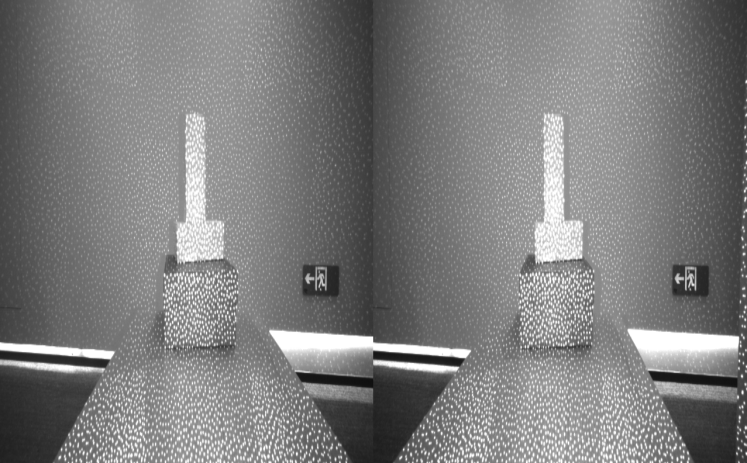
功能描述:演示獲取雙紅外相機(jī)圖像,顯示左右紅外圖像,并通過ESC_KEY鍵退出程序
>本示例基于C++ High Level API進(jìn)行演示
創(chuàng)建Pipeline, 獲取設(shè)備
ob::Pipeline pipe
配置左IR
// Get the ir_left camera configuration list
auto irLeftProfiles = pipe.getStreamProfileList(OB_SENSOR_IR_LEFT);
if(irLeftProfiles == nullptr) {
std::cerr
<< "The obtained IR(Left) resolution list is NULL. For monocular structured light devices, try opening the IR data stream using the IR example. "
<< std::endl;
return 0;
}
// Open the default profile of IR_LEFT Sensor, which can be configured through the configuration file
try {
auto irLeftProfile = irLeftProfiles->getProfile(OB_PROFILE_DEFAULT);
config->enableStream(irLeftProfile->as<ob::VideoStreamProfile>());
}
catch(...) {
std::cout << "IR(Left) stream not found!" << std::endl;
}
配置右IR
// Get the ir_right camera configuration list
auto irRightProfiles = pipe.getStreamProfileList(OB_SENSOR_IR_RIGHT);
// Open the default profile of IR_RIGHT Sensor, which can be configured through the configuration file
try {
auto irRightProfile = irRightProfiles->getProfile(OB_PROFILE_DEFAULT);
config->enableStream(irRightProfile->as<ob::VideoStreamProfile>());
}
catch(...) {
std::cout << "IR(Right) stream not found!" << std::endl;
}
開啟pipeline
pipe.start(config);
獲取幀數(shù)據(jù)
auto leftFrame = frameSet->getFrame(OB_FRAME_IR_LEFT);
auto rightFrame = frameSet->getFrame(OB_FRAME_IR_RIGHT)
停止pipeline
pipe.stop();
預(yù)期輸出: