
C++ 點云示例代碼-Point Cloud
# 點云示例-PointCloud
功能描述:連接設備開流 ,生成深度點云或RGBD點云并保存成ply格式文件,并通過ESC_KEY鍵退出程序
> 本示例基于C++ High Level API進行演示
創(chuàng)建點云保存成ply格式文件函數(shù),ply文件格式詳細描述可在網(wǎng)絡上查看<br />首先創(chuàng)建兩個函數(shù)來保存從流里面獲取到的點云數(shù)據(jù),這是保存普通點云數(shù)據(jù)的函數(shù)
//保存點云數(shù)據(jù)到ply
void savePointsToPly(std::shared_ptr<ob::Frame> frame, std::string fileName) {
int pointsSize = frame->dataSize() / sizeof(OBPoint);
FILE *fp = fopen(fileName.c_str(), "wb+");
fprintf(fp, "ply\n");
fprintf(fp, "format ascii 1.0\n");
fprintf(fp, "element vertex %d\n", pointsSize);
fprintf(fp, "property float x\n");
fprintf(fp, "property float y\n");
fprintf(fp, "property float z\n");
fprintf(fp, "end_header\n");
OBPoint *point = (OBPoint *)frame->data();
for(int i = 0; i < pointsSize; i++) {
fprintf(fp, "%.3f %.3f %.3f\n", point->x, point->y, point->z);
point++;
}
fflush(fp);
fclose(fp);
}
再創(chuàng)建一個保存彩色點云數(shù)據(jù)的函數(shù)用于存儲彩色點云數(shù)據(jù)
//保存彩色點云數(shù)據(jù)到ply
void saveRGBPointsToPly(std::shared_ptr<ob::Frame> frame, std::string fileName) {
int pointsSize = frame->dataSize() / sizeof(OBColorPoint);
FILE *fp = fopen(fileName.c_str(), "wb+");
fprintf(fp, "ply\n");
fprintf(fp, "format ascii 1.0\n");
fprintf(fp, "element vertex %d\n", pointsSize);
fprintf(fp, "property float x\n");
fprintf(fp, "property float y\n");
fprintf(fp, "property float z\n");
fprintf(fp, "property uchar red\n");
fprintf(fp, "property uchar green\n");
fprintf(fp, "property uchar blue\n");
fprintf(fp, "end_header\n");
OBColorPoint *point = (OBColorPoint *)frame->data();
for(int i = 0; i < pointsSize; i++) {
fprintf(fp, "%.3f %.3f %.3f %d %d %d\n", point->x, point->y, point->z, (int)point->r, (int)point->g, (int)point->b);
point++;
}
fflush(fp);
fclose(fp);
}
設置Log等級,避免過多Info等級的Log影響點云輸出的結果
ob::Context::setLoggerSeverity(OB_LOG_SEVERITY_ERROR);
創(chuàng)建一個Pipeline,通過Pipeline可以很容易的打開和關閉多種類型的流并獲取一組幀數(shù)據(jù)
ob::Pipeline pipeline;
配置color流
auto colorProfiles = pipeline.getStreamProfileList(OB_SENSOR_COLOR);
if(colorProfiles) {
auto profile = colorProfiles->getProfile(OB_PROFILE_DEFAULT);
colorProfile = profile->as<ob::VideoStreamProfile>();
}
config->enableStream(colorProfile);
配置深度流
std::shared_ptr<ob::StreamProfileList> depthProfileList;
OBAlignMode alignMode = ALIGN_DISABLE;
if(colorProfile) {
// Try find supported depth to color align hardware mode profile
depthProfileList = pipeline.getD2CDepthProfileList(colorProfile, ALIGN_D2C_HW_MODE);
if(depthProfileList->count() > 0) {
alignMode = ALIGN_D2C_HW_MODE;
}
else {
// Try find supported depth to color align software mode profile
depthProfileList = pipeline.getD2CDepthProfileList(colorProfile, ALIGN_D2C_SW_MODE);
if(depthProfileList->count() > 0) {
alignMode = ALIGN_D2C_SW_MODE;
}
}
}
else {
depthProfileList = pipeline.getStreamProfileList(OB_SENSOR_DEPTH);
}
if(depthProfileList->count() > 0) {
std::shared_ptr<ob::StreamProfile> depthProfile;
try {
// Select the profile with the same frame rate as color.
if(colorProfile) {
depthProfile = depthProfileList->getVideoStreamProfile(OB_WIDTH_ANY, OB_HEIGHT_ANY, OB_FORMAT_ANY, colorProfile->fps());
}
}
catch(...) {
depthProfile = nullptr;
}
if(!depthProfile) {
// If no matching profile is found, select the default profile.
depthProfile = depthProfileList->getProfile(OB_PROFILE_DEFAULT);
}
config->enableStream(depthProfile);
開啟D2C對齊, 生成RGBD點云時需要開啟
// 開啟D2C對齊, 生成RGBD點云時需要開啟
config->setAlignMode(ALIGN_D2C_HW_MODE);
啟動Pipeline
pipeline.start( config );
創(chuàng)建點云Filter對象,并且設置相機內參
// 創(chuàng)建點云Filter對象(點云Filter創(chuàng)建時會在Pipeline內部獲取設備參數(shù), 所以盡量在Filter創(chuàng)建前配置好設備)
ob::PointCloudFilter pointCloud;
//獲取相機內參傳入點云Filter中
auto cameraParam = pipeline.getCameraParam();
pointCloud.setCameraParam(cameraParam)
設置些操作提示
std::cout << "Press R to create rgbd pointCloud and save to ply file! " << std::endl;
std::cout << "Press d to create depth pointCloud and save to ply file! " << std::endl;
std::cout << "Press ESC to exit! " << std::endl;
設置主流程通過上面創(chuàng)建的點云Filter對象獲取并保存點云數(shù)據(jù)
if(key == 'R' || key == 'r') {
count = 0;
//限制最多重復10次
while(count++ < 10) {
//等待一幀數(shù)據(jù),超時時間為100ms
auto frameset = pipeline.waitForFrames(100);
if(frameset != nullptr && frameset->depthFrame() != nullptr && frameset->colorFrame() != nullptr) {
try {
//生成彩色點云并保存
std::cout << "Save RGBD PointCloud ply file..." << std::endl;
pointCloud.setCreatePointFormat(OB_FORMAT_RGB_POINT);
std::shared_ptr<ob::Frame> frame = pointCloud.process(frameset);
saveRGBPointsToPly(frame, "RGBPoints.ply");
std::cout << "RGBPoints.ply Saved" << std::endl;
}
catch(std::exception &e) {
std::cout << "Get point cloud failed" << std::endl;
}
break;
}
}
}
else if(key == 'D' || key == 'd') {
count = 0;
//限制最多重復10次
while(count++ < 10) {
//等待一幀數(shù)據(jù),超時時間為100ms
auto frameset = pipeline.waitForFrames(100);
if(frameset != nullptr && frameset->depthFrame() != nullptr) {
try {
//生成點云并保存
std::cout << "Save Depth PointCloud to ply file..." << std::endl;
pointCloud.setCreatePointFormat(OB_FORMAT_POINT);
std::shared_ptr<ob::Frame> frame = pointCloud.process(frameset);
savePointsToPly(frame, "DepthPoints.ply");
std::cout << "DepthPoints.ply Saved" << std::endl;
}
catch(std::exception &e) {
std::cout << "Get point cloud failed" << std::endl;
}
break;
}
}
}
最后通過Pipeline來停止流
pipeline.stop();
程序正常退出后會釋放資源
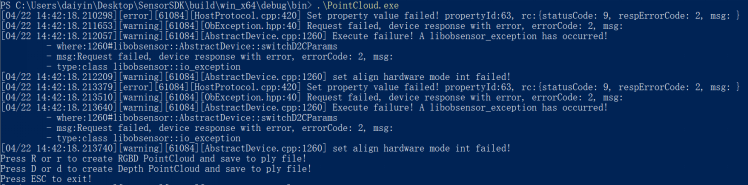
預期輸出: